Despite it happening 25 years or so ago, I still have a vivid memory of a beautiful spring day back when I was in high school.
I was eating lunch with my friends, gazing out the window, and suddenly a hush came over the cafeteria. This was odd as the cafeteria was never quiet. And I think everyone just kind of instinctively knew that something was about to happen.
I looked up just in time to see a lone milk carton gracefully sailing the entire length of what was a very long, very full, very quiet room.
Splat.
It was thrown at nobody in particular. Just thrown. It hit nobody. Just the floor.
In the split second between the carton hitting the floor and the milk inside said carton creating a beautiful, fountain-like plume of cow’s milk, everyone—and I mean everyone—in the cafeteria sprang to their feet at the same time and started throwing food at each other in a hysterical, frenzied, yet physically harmless display of insanity.
Anyway, that’s what it felt like opening up Twitter the day Elon Musk took over.
And whether you’re dead set on quitting Twitter and never coming back, or you’re waiting to see how the near-future shakes out, here’s how to grab an archive of your tweets, photos, direct messages, and other activity–and then delete your account once you’re ready. That way you can remember the way things were, no matter what lies ahead.
Download an archive of your data
If you’re on a computer, click here or fire up Twitter and in the left-hand column at the very bottom, click “More” and navigate to Settings and Support > Settings and privacy > Your account > Download an archive of your data.
If you’re using the app on your phone, click your profile photo in the upper-left corner, then Settings and Support > Settings and privacy > Your account > Download an archive of your data.
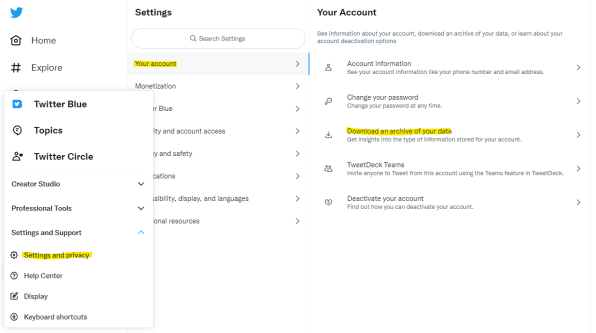
You’ll then be asked to provide your password again, at which point you can request that the archive be packaged up.
This isn’t an instant process: Twitter says it can take up to 24 hours for it to prepare your data. But you’ll get an email once it’s ready for download.
Make sense of the archived data
This part is best done from a computer because you’ll need to do some decompression and folder navigation.
Once you’ve downloaded the archive, which is a Zip file, decompress it and you’ll end up with a folder full of files.
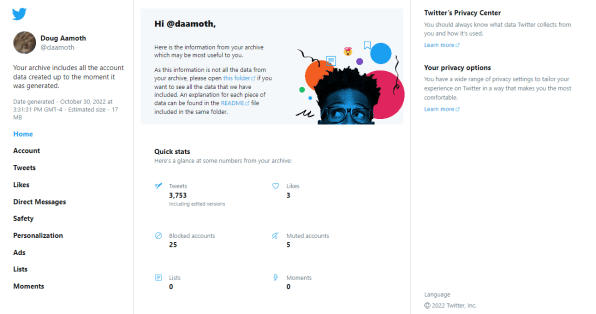
The file called archive.html contains all your tweets, direct messages, recent likes, lists, and a few other bits and bobs. It’s a good place to start if you want to stroll down Memory Lane.
There’s also a folder called tweet_media that contains all the images and videos you’ve uploaded.
Those are the two areas of interest, but there’s another file called README.txt that explains what each of the other files and folders are for.
Delete your Twitter account
This part is easy if you’ve done the archive step up above.
Same navigation: either click here or go to Settings and Support > Settings and privacy > Your account except this time, at the very bottom, you’ll notice the Deactivate your account link.
You’ll be served a little warning message that your account will be no more, and two other pieces of important info. First, that you’ll be able to reactivate within 30 days if you change your mind.
Second, that you’ll need to wait to download your archived data from the step above before you deactivate your account. In other words, don’t start the archive process, delete your account, and then expect an email with all your stuff. Wait for the email, download the archive, then delete your account.
(128)

