The best digital frames for 2025
There’s a lot of junk on the market — these are the best smart frames that are worth your money.


Making a good digital picture frame should be easy. All you need is a good screen and an uncomplicated way to get your favorite photos onto the device. Combine that with an inoffensive, frame-like design and you’re good to go.
Despite that, I can tell you that many digital photo frames are awful. Amazon is positively littered with scads of digital frames and it’s basically the 2020s version of what we saw with knock-off iPods back in the 2000s. There are loads of options that draw you in with a low price but deliver a totally subpar experience that will prompt you to shove the thing in a drawer and forget about it.
The good news is that you only need to find one smart photo frame that works. From there, you can have a pretty delightful experience. If you’re anything like me, you have thousands of photos on your phone of friends, family photos, pets, vacation spots, perhaps some lattes or plates of pasta and much more. Too often, those photos stay siloed on our phones, not shared with others or enjoyed on a larger scale. And sure, I can look at my photos on my laptop or an iPad, but there’s something enjoyable about having a dedicated place for these things. After all, there’s a reason photo frames exist in the first place, right? A great frame can help you send photos to loved ones and share cherished memories with friends and family effortlessly. I tested out seven smart photo frames to weed through the junk and find the top picks for the best digital frames worth buying.

Best digital photo frame overall
Aura 10.1″ Carver Mat Digital Frame

Best budget digital photo frame
PhotoSpring 10″ WiFi Digital Picture Frame

Best digital frame smart display
Google Nest Hub Max
Best digital picture frames for 2025

AURA
Best digital photo frame overall
Aura 10.1″ Carver Mat Digital Frame
$179 at Amazon

PhotoSpring
Best budget digital photo frame
PhotoSpring 10″ WiFi Digital Picture Frame
$90 at Amazon
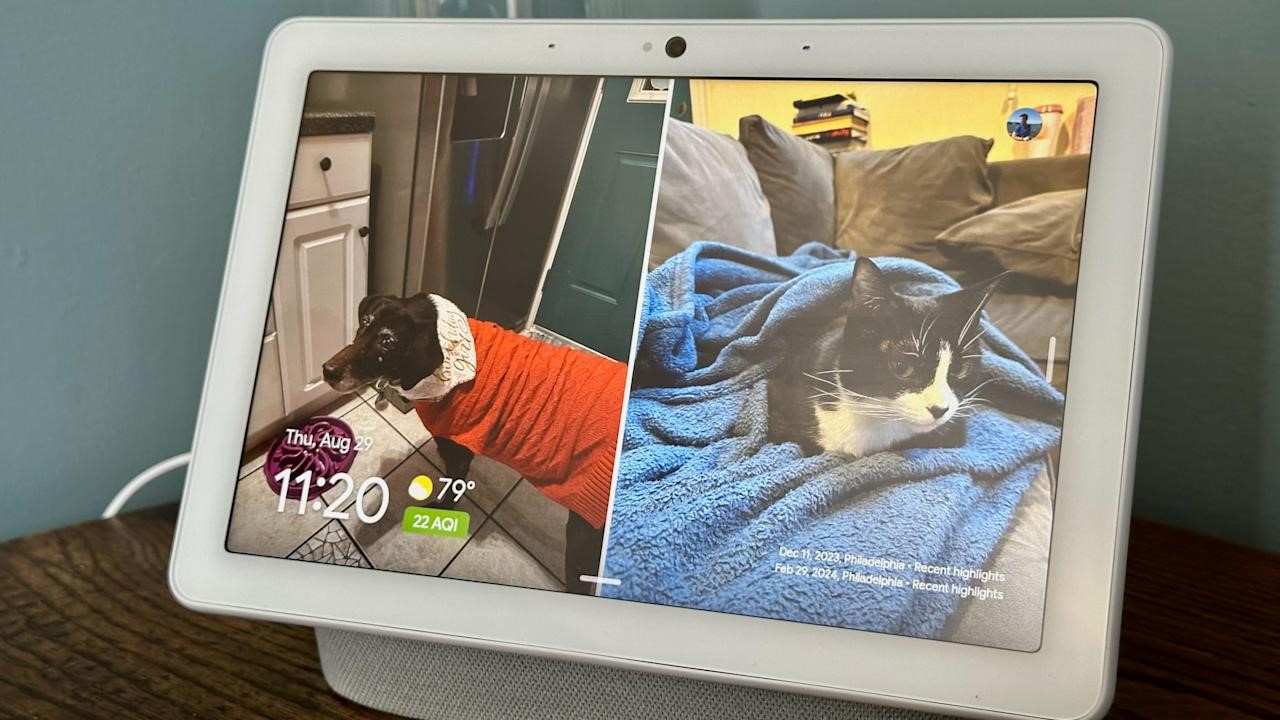
Best digital frame smart display
Google Nest Hub Max
- Good display quality with auto-brightness and warmth settings
- Getting images on it is a piece of cake, provided you use Google Photos
- Plenty of ways to control smart home devices
- Good-sounding speaker
- Almost five years old
- Google Assistant’s days are likely numbered
- More expensive than a standard digital photo frame
$189 at Walmart
What to look for in digital picture frames
While a digital photo frame feels like a simple piece of tech, there are a number of things I considered when trying to find one worth displaying in my home. First and foremost was screen resolution and size. I was surprised to learn that most digital photo frames have a resolution around 1,200 x 800, which feels positively pixelated. (That’s for frames with screen sizes in the nine- to ten-inch range, which is primarily what I considered for this guide.)
But after trying a bunch of frames, I realized that screen resolution is not the most important factor; my favorite photos looked best on frames that excelled in reflectivity, brightness, viewing angles and color temperature. A lot of these digital photo frames were lacking in one or more of these factors; they often didn’t deal with reflections well or had poor viewing angles.
A lot of frames I tested felt cheap and looked ugly as well, which isn’t something you want in a smart device that sits openly in your home. That includes lousy stands, overly glossy plastic parts and design decisions I can only describe as strange, particularly for items that are meant to just blend into your home. The best digital photo frames don’t call attention to themselves and look like an actual “dumb” frame, so much so that those that aren’t so tech-savvy might mistake them for one.
Perhaps the most important thing outside of the display, though, is the software. Let me be blunt: a number of frames I tested had absolutely atrocious companion apps and software experiences that I would not wish on anyone. One that I tried did not have a touchscreen, but did have an IR remote (yes, like the one you controlled your TV with 30 years ago). Trying to use that with a Wi-Fi connection was painful, and when I tried instead to use a QR code, I was linked to a Google search for random numbers instead of an actual app or website. I gave up on that frame, the $140 PixStar, on the spot.
Other things were more forgivable. A lot of the frames out there are basically Android tablets with a bit of custom software slapped on the top, which worked fine but wasn’t terribly elegant. And having to interact with the photo frame via touch wasn’t great because you end up with fingerprints all over the display. The best frames I tried were smart about what features you could control on the frame itself vs. through an app, the latter of which is my preferred method.
Another important software note: many frames I tried require subscriptions for features that absolutely should be included out of the box. For example, one frame would only let me upload 10 photos at a time without a subscription. Others would let you link a Google Photos account, but you could only sync a single album without paying up. Yet another option didn’t let you create albums to organize the photos that were on the frame — it was just a giant scroll of photos with no way to give them order.
While some premium frames offer perks like unlimited photos or cloud storage, they often come at a cost. I can understand why certain things might go under a subscription, like if you’re getting a large amount of cloud storage, for example. But these subscriptions feel like ways for companies to make recurring revenue from a product made so cheaply they can’t make any money on the frame itself. I’d urge you to make sure your chosen frame doesn’t require a subscription (neither of the frames I recommend in this guide need a subscription for any of their features), especially if you plan on giving this device as a gift to loved ones.
How much should you spend on a digital picture frame
For a frame with a nine- or ten-inch display, expect to spend at least $100. Our budget recommendation is $99, and all of the options I tried that were cheaper were not nearly good enough to recommend. Spending $150 to $180 will get you a significantly nicer experience in all facets, from functionality to design to screen quality.
Digital frames FAQs
Are digital photo frames a good idea?
Yes, as long as you know what to expect. A digital picture frame makes it easy to enjoy your favorite shots without printing them. They’re especially nice for families who want to display new photos quickly. The key is understanding the limitations. Some frames have lower resolution displays or need a constant Wi-Fi connection to work properly, so they’re not a perfect replacement for a high-quality print on the wall. But if you want a simple way to keep memories on display and up to date, they’re a solid choice.
Can you upload photos to a digital frame from anywhere?
Most modern digital frames let you do this, but it depends on the model. Many connect to Wi-Fi and use apps, cloud storage or email uploads, so you can add photos from your phone no matter where you are. Some even let family members share directly, which is great for keeping grandparents updated with new pictures. That said, a few budget models only work with USB drives or memory cards, so check how the frame handles uploads before buying.
Georgie Peru contributed to this report.
(15)
